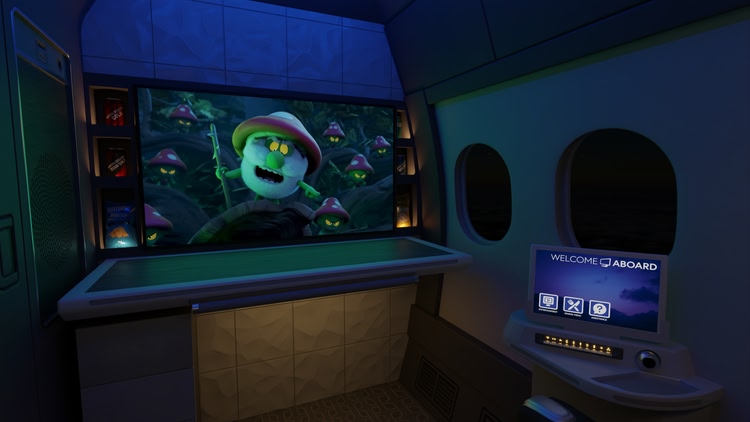
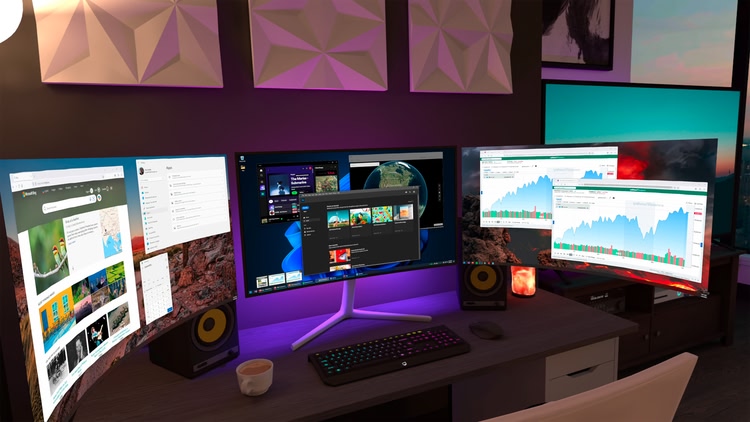
Connect wirelessly to your computer(s) to watch movies, browse the web, play games on a giant virtual screen or stream PCVR games. Virtual Desktop is a highly optimized, native application developed for low latency, high quality streaming.
• Computer must be wired with Gigabit Ethernet cable to a 5 GHz router
• Supports most PCs and laptops running Windows 10 or 11, macOS Catalina or later
• PCVR game streaming requires a VR Ready PC running Windows 10 or 11
• Videos tab allows you to download or stream regular/180/360 videos directly from your computer
• Supports Bluetooth mice, keyboards and gamepads
• Supports 3D Side-by-Side / Over-Under content on screen
• Supports multi-monitors (physical and/or virtual)
• Includes a Microphone passthrough option
• Supports remote connections over the internet (enable UPnP on your router)
| Mixed reality | |
| comfort | ⦾ Comfortable |
| age rating | 0+ Everyone |
| storage | 1.1 GB |
| website | vrdesktop.net |
| developer | Virtual Desktop, Inc. |
| publisher | Virtual Desktop, Inc. |
| connection | Internet not required |
| app version | 1.34.12.0 |
| languages |
English
|
I was suffering from stuttering in ETS2, using link cable. After weeks of tweaking config and trying every other possible solution I found online, I decided to give VD a go. Stutter has gone, and clarity has improved. Some titles don't get recognised in the game tab, but they can be launched via the notification icon, so it's not a big issue.
10/10.
Just buy it.
Asked the devs on discord a few questions if the pc app was ever going to support steam os with the steam maching coming out and they were extremely rude and attempted to drag me into drama regarding how they believe that people should pay for updates dont give them your money they dont deserve it and couldn't manage a starbucks genuinely terrible customer service to the point where they would tell customers off compared to just answering their queries and getting on with their day use steamlink instead its free
Very professional response below very good at providing customer service *obvious sarcasm*
But in all seriousness at this stage I don't even care about the questions i asked but rather how I was treated for asking them and would genuinely advise against anyone from making a purchase of this app in future because if this is how they treat someone for asking a simple questions to who knows what awful way they treat anyone who has issues with their app and for years of experience with software purchases and also having a career in the computer industry I have never came across a business that treats a customer with such disgraceful intent for simply asking why
(Also for the developer who keeps changing his response i was satisfied with the explanation I was initially given from your first member of staff and was at the point done after i left the source of why i had intial came asking but it was your staff who dragged the situation out and as for profanity I only told you to go f yourself as you took out you aggression on me so I think you should look at this situation and take it as feedback to how you should conduct yourself for your business and if u want this massive negative review to dissappear then you should start apologising for how your staff acted)
Guess I'm stuck trying to get it to work. I wanted this to be able to use my keyboard and mouse with this app for my pc games, but this app let's you see into the real world. I can type without looking at keys, but it still won't let me type anything on my keyboard/mouse (connected to computer) that I'm trying to get stuff done with. This app is more headaches than solutions. I tried the in-app help, and it keeps saying it's not helpful.
This app has an incredible amount of options that aren't offered by air link or steam link. It also has the best overlay, way better than meta or steam desktop view. It opens the ability to use the VDXR runtime, which can be huge for performance. Color optionn, codec options, optimization options, it allows for snapdragon super resolution, extra image sharpening, etc. Meta focuses the standalone experience, often neglecting the PCVR side of the quest headset. virtual desktop picks up the slack of that neglect by offering this product. All while having a very helpful community that will work with you to help you understand & fix any issues you run into. You will notice right away that VD makes your VR games look & feel better. If you run air link for PCVR, and haven't given VD a shot, you're missing ou
Cool when it works, but that's rare
I've tried all of the other ways of streaming PCVR wirelessly, official or otherwise and none worked correctly. Either the lag and stutter was unplayable or there wasn't even audio at all. I was a bit skeptical if Virtual Desktop could do any better but I actually just finished the first few levels of Alyx without so much as a few very brief glitches, and I was almost certain I wouldn't be able to properly play PCVR wirelessly.
I am now a believer in Virtual Desktop and can see that it will be one of those essential Quest apps I use in heavy rotation like QGO and Skybox.
Thanks for finally making PCVR possible for my setup!