Apps Reality Ruler

Productivity ∙ Utilities
4.0
22 ratings 14 reviews
release date
2023
September 21
game modes
• Singleplayer
player modes
• Room-scale
compatibility
• Quest 2/Pro • Quest 3/3S

Unlock the potential of spatial comprehension with Reality Ruler: 3D Measurement in Mixed Reality (MR)! Our app harnesses the pass-through mode of your device, transforming your surroundings into a digital workspace for precise measurement.

Key Features:
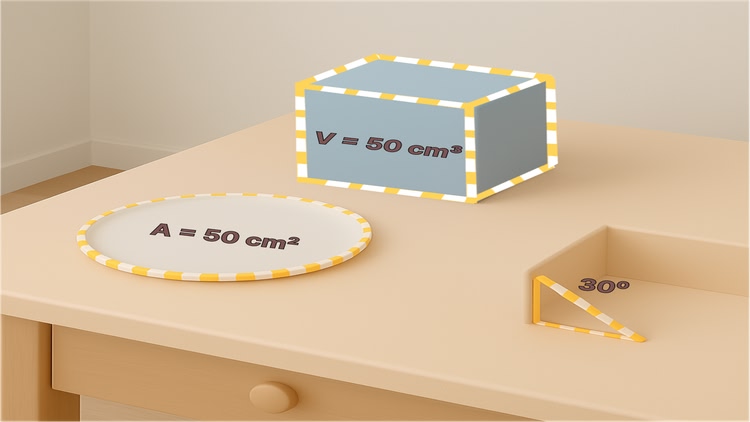
Measure Line Lengths: Sketch lines in real-world space and instantly obtain their lengths.
Area Calculations: Assess the area of polygons, rectangles, and circles with intuitive gestures.
Angles: Obtain accurate angles between intersecting lines in three-dimensional space.
Volumetrics: Estimate the volume of 3D shapes such as cuboids, cylinders, cones, and spheres.
Reality Ruler boasts an intuitive interface and streamlined controls, ensuring accessibility for users of all backgrounds. Whether you're a student mastering geometry, a craftsman planning a project, or simply intrigued by spatial awareness, Reality Ruler offers a precise and interactive means to measure the world around you.

Transform your headset into a sophisticated measurement tool with Reality Ruler: 3D Measurement in MR.

Enhanced Features:

Save and Load Measurements: Preserve and retrieve your measurements effortlessly.
Height Estimation: Determine the height of objects or rooms with ease.
Customization: Personalize line colors and widths to suit your preferences.
Room Layout Visualization: Gain insight into room layouts based on measured dimensions.
Experience the fusion of digital precision and physical reality with Reality Ruler: 3D Measurement in MR.

Mixed reality
comfort Comfortable
age rating0+ Everyone
storage0.4 GB
websitevisionxr.co.in
developerVisionXR
publisherVisionXR
connectionInternet required
app version1.1
languages
English

Price History

Add-ons 1

Add-on
$1.99 ended Nov 3
$2.99

Developer posts 1

Reviews 14

Soulmagic21 days ago

Almost unbelievable

This is amazing! Holly cow it's a game changer! I can use this for so many things!!!!!

Wait... how do you save? How do export?

I never had an app go from a 10 to a zero so fast.

What's the point?

To almost be amazing?

To almost be useful?

Sigh...

danielemang059 days ago
3

Apparently it is impossible to scan room

I manually set walls and now I can't rescan the room, no matter what. The home screen is missing the "scan room" button.

Edit: I discovered that it is possible to reset the room throughout quest settings, but it is not explained at all in the app, that wrongfully invites you to scan again the room with a non-existent button in the menu.

58 days ago

Thank you for pointing this out! 🙏 You’re absolutely right — the missing Scan Room button was an oversight on our part. At the moment, the only way to reset the room is through Quest system settings, which isn’t clearly explained in the app.

We’re already fixing this and will reintroduce the option to rescan directly from the home screen in our next update (coming next week ✅). Along with this fix, we’re also adding a few new features to make the overall experience smoother and more flexible.

We appreciate your feedback — it really helps us improve Reality Ruler! 🚀

Killer_Marz3 months ago

Buggy need refund

I bought the in-game feature to measure the volume of a hexagon prism, and the line did not follow where my hands went. And it only allowed me to draw out awkward shaped triangles. This did not help me at all. I would like a refund please.

3 months ago

Dear Killer_Marz,

Thank you for sharing your feedback regarding Reality Ruler. We're sorry to hear about the inconvenience you experienced with measuring the volume of a hexagon prism. We understand your frustration and would like to assist you further.

Regarding the issue you encountered, we have thoroughly tested the feature for measuring hexagonal volumes, including adjusting the number of sides in the UI and using hand or controller gestures to create and drag the prism upwards. Our tests have shown that the feature is functioning correctly.

To ensure you can make full use of Reality Ruler, we recommend checking the following steps:

Ensure your environment is well-lit and suitable for accurate room detection.

Review the tutorial provided to familiarize yourself with the features and controls.

If you require additional assistance or have further questions, please feel free to reach out to us directly at visionxr.opc@gmail.com.

If you still prefer a refund, please contact us directly via email, and we will process it promptly. We value your feedback and are committed to providing you with a positive experience using Reality Ruler.

Thank you for your understanding and patience.

Best regards,

VisionXR Team

Syrell4 months ago
3

Nice app, but...

I do not find a way to measure a new room. It says in the "Home" menue, but nothing works here... I could not delete the old room or add another one... maybe someone has a hint!

4 months ago

Thank you for your feedback and for highlighting your experience with Reality Ruler. We appreciate your patience and understanding regarding the current limitation with measuring multiple rooms.

As a solution, before launching the app, you can scan multiple rooms in your Meta Quest settings. This allows you to measure different rooms consecutively.

We understand the importance of multi-room support directly within the app and are pleased to inform you that this feature will be included in our upcoming update, scheduled within the next two weeks. This update will enable users to seamlessly measure multiple rooms directly through the app interface.

We appreciate your continued support and look forward to bringing you an enhanced experience with Reality Ruler.

Best regards,
Vision XR

avidblur7 months ago
5

Exceptionally well built, good accuracy!

Good accuracy given it's in mixed reality, desperately needs a few things:

A: To be collaborated with and built in to the app "Visual Scale". Probably a no go but a boy can dream

B: DESPERATELY needs a SNAP TO feature! Consider adding a special section for a point called a snap-point & snap-line where the users ray casts or controller snaps to a point/line if it gets within a certain distance of said point (then provide a toggle switch to turn snapping on and off) - this would make setting up grid lines for things like laying out pendant lights on a job site much more intuitive and has real commercial value! (should also have things like forced 90 degree triangles etc that expand and contract along the opposite/adjacent)

C: for imperial offer a unit option that does them by fractions (ie displays 5-5/8" instead of a decimal point displayed)

D: laser level, which basically acts as an ultra thin rectangle to the ceiling and floor of the space (this is actually already doable using the cuboid function but isn't nearly as clean, it should ideally be parallel to the walls detected in the space & this is a humongous missed opportunity on the part of Meta's own layout app.

E: color swatcher of 6 standard colors as well as the color dials for measurements so they can be consistently colored from measurement to measurement based on grouping.

Great app! I'm already blown away by its real world applications. Let me know if you'd like some real in field bug testing & videos done I'd be happy to do it for free as a beta tester!

7 months ago

Thank you so much for your detailed and thoughtful review!

We really appreciate your feedback and are glad you're enjoying Reality Ruler. You've shared some fantastic suggestions — especially the snap-to feature, laser level alignment, and imperial fractions display — all of which have great potential to improve the app's usability and professional value. We're taking notes on each point and will explore how we can incorporate them into future updates.

We’d love to have you as a beta tester! Your in-field experience and insights would be incredibly helpful. We’ll reach out soon with details.

Thanks again for your support!

tigersport1 year ago
3

Great so far but needs refinement

Hi
I find this app very interesting and has good potential. There some annoying issues that could be resolved
1. Selecting the function that is required uses the 'red ball' to make a selection. This does not always work and I find I have to hit the function several times with the 'red ball' before it is selected. Would it not be better to be able to use the top joysticks on the controller to select and make a function active.

2. If I want to undo my last action again I have to use the 'red ball' to make the undo selection . Would it not be better to use one of the controller buttons as a dedicated undo /redo function.

3. when scanning spaces it appears the system cannot cope with sloping ceilings or sloping floors. is there a way around this?

4. I have found out that I can create several spaces to overcome the problem of the limited safe space size. I have managed to go around the outside of my house and scan the exterior but I cannot create one large safe pass through space. I could however create several spaces and then just walk between them as I measured my exterior walls.

5. it would be useful to be able to remove furniture scans to leave an empty room for simply getting the areas and dimensions of a room.

thanks for your hard work so far

1 year ago

Hello,

Thankyou for the review.

We would fix issue1,issue 2 and 3 in next update.

For problem 5 you can go to SaveAndLoadPanel >> Scanned Objects and hide the undesired objects.

As of now there is no solution for issue 4 . May be in future updates when oculus removes boundary we would do it.

1-6 of 14